Here’s another step in my “perfect” Garuda Linux installation. Just installing the OS is one thing, but I have to get all my programs installed and the settings the way I like them.
This is my next article in my “perfect” Garuda Linux install. Remember that I’m coming from Ubuntu and was looking for something different. If you haven’t followed along, here’s the articles so far:
This is a continuation of my Garuda Linux installation notes. Remember, I’m coming from Ubuntu Linux. I used to reinstall it every 6 months (or at least intended to). I decided to do something different, and that brings me here. You can go back in the series:
One of my biggest issues with Flutter development is if you let your project sit for a while and come back to it, you have to spend forever trying to get it to run again. Flutter upgrades, but the configuration in the projects don’t and become incompatible. Getting the configuration upgraded to match proves difficult.
I feel like things are getting better and there are better tools, but it is still a challenge. This article is what I have discovered so far. It’s just a few ideas of things you can check.
One of the first things I need to get working is the screenshots. They are needed to help document what I do with the OS. Normally, I’m used to Flameshot. Gnome has a pretty good one, but Flameshot adds some better annotations and features. Now that I’m in Garuda/KDE the world is different. It comes preinstalled with Spectacle.
With the beginning of 2024, I decided to try something different: Distro Hop! Ubuntu has served me well, but I wanted to put the fun back into Linux. It’s all about exploring and finding things new. Originally, I thought there was an issue between my laptop, my Thunderbolt dock, and my mouse. I had hopes that trying something new would fix that. It turns out that just before installing, I would discover that it was the mouse going bad and not the dock or the laptop after all.
So, I’ve installed Garuda Linux, and I’m working toward the “perfect install”. I like the look so far. It’s only going to work if I can get my work and critical applications going. So far, I think I have accomplished that. I can connect to my remote desktops. I can talk to my co-workers through MS Teams. So, I can keep it. Now, I just need to fine tune it to work out all of the kinks.
Here’s what I have so far:
Note that I have one monitor vertical and one horizontal. That took a little to get setup, but I like the option of getting to stack windows on top of each other or having a really tall window for reading.
Picking the Version
Going to the download page brings up a bunch of different options. You can pick whichever front end, look and feel that you want.
Garuda KDE Dr460nized
Garuda Linux Gnome
Garuda Cinnamon
Garuda Xfce
Garuda Sway
Garuda i3-wm
Garuda Linux KDE lite
Garuda Linux Hyprland
Which one did I choose? Well, of course, I wanted to dive in and get the full experience. The Dr460nized seemed to be that full experience. I got the impression that was where they put most of their effort. I’d love to try the Hyprland because it sounds exotic and new, but I wasn’t that adventurous yet. Maybe I’ll play with it a bit on a VM first.
What’s Different
First, it’s KDE. That has a big difference in look and feel when coming from Gnome. Much of that is in the Applications menu. I really liked Gnome’s application launcher combined with the window picker. Going to KDE’s menu seemed like stepping back into the Windows’ Start Menu. But, it still had the application search, so I’m okay with it.
Next, I wasn’t paying attention. For some reason, I thought it was Debian/Ubuntu based. No, it is Arch based. That means that you have to use pacman instead of apt. I do love the little Pacmans that crawl across the process bar as it downloads.
Had I been paying attention, I probably wouldn’t have made the jump. My fear is that things wouldn’t be compatible. For example, work software like Teams and VMWare Horizon seems to be only offered in deb or rpm format. I was pleasantly surprised that, so far, I’ve been able to find everything I needed already in the libraries.
Another big difference is that the task bar is on the bottom. Since I’m coming from Ubuntu, I’m used to it on the left side of my main screen.
The Bling
I am enjoying the look of the desktop. One could argue the bling wastes processing power and memory. I don’t think it’s a waste for two reasons. First, I’m a consultant who sometimes shares his desktop screen. People judge a craftsman by his tools, and I want my tools to say that I’m an expert tech who is pushing the limits. Second, the bling makes it feel enjoyable. I feel like I’m using a cool tool, and that makes it fun.
So, what makes it bling? The first thing that stood out to me is the theme. The icons on the taskbar and the background kind of wrap it together into a complete work. The Applications Menu is also themed to match. The black background also adds to the techy feel.
Another bling is the wobbly effect when you drag the windows around. This happens by default on Garuda Linux, but I had to add an extension to get it on Ubuntu. This is a little more subtle but that almost makes it a little more elegant. You can see the Konsole window distorted below as I dragged it across the screen.
The Install
The install process was pretty simple. I think the most unique thing was that at the end, it simply asked you which apps you would use and wanted to install. You can always get back to that by launching the Garuda Welcome app:
The install program that I’m talking about loads when you click Setup Assistant.
Unfortunately, it has to go through this long setup process before you get to that page.
When that’s done, you can get back to the Setup Assistant with the list of apps. Unfortunately, it doesn’t show you what you’ve already installed.
The Actual Install Process
Ok, I got the cart before the horse here. So, I went back and grabbed some screenshots of the install wizard. I don’t know that it makes sense to put all the screens, but I’ll give a little commentary on a few of them. The startup screen starts with a great first impression that pulls in the theme with the rest of the desktop.
The Location and Keyboard screens were straightforward and I just accepted the defaults. The partition screen was pretty simple. I like being able to just erase the disk and let it do it’s thing. The encryption option is great. When it booted, the passphrase screen was not near as nice as Ubuntu’s.
The Users screen was pretty standard. Then, that brought us to the summary for one last review.
Through the install process, we got a nice progress screen.
Finally, when it is done, you get this nice finished screen where it offers to reboot.
As I said, the grub passphrase isn’t as nice. Previously on Ubuntu, I got the nice Dell logo and a stylized prompt. Granted this screenshot is from a VM, but it looks the same on my laptop. It’s only for a few seconds and then forgotten, so I’m not sure how much it’s worth fixing.
Upcoming
Stay tuned. I hope to post more about my progress with getting it setup and fine-tuned.
Ok, all I have to say is, “I’m sorry”. I’ve been sitting on these install notes for almost a year. I’m currently writing this paragraph on my newly installed Garuda Linux on the first day of 2025. I’ve been using Ubuntu 24.04 for quite a long time, and I just can’t seem to get this article finished off and published.
I could come up with a lot of excuses, but the reality is that I have lost my focus on blogging. I’m getting pulled in too many other directions, and I haven’t had the time. Maybe I just haven’t made the time.
Excuses, you ask? Well, I could try to blame this on my mouse issues. These articles used to have “perfect installation” in the title, and this was far from it. To be fair, I don’t think any of it was Ubuntu’s fault or even the OS. I really don’t know who’s to blame, but boy, has it been frustrating. My mouse won’t click and drag reliably. Dragging a window across the screen or drawing a box in Inkscape just won’t work. I notice it constantly in screenshots. It’s hard to draw the area of the screen I want to shot, but then, when I try to draw a circle around something, I get multiple circles. It’s like it’s too tired to realize I was holding the button down the whole time.
Whose fault is it? I’ll never know. I tried all kinds of things. I blamed it initially on the dock because it only happens when the laptop is on the dock. Plugable was great help even though they don’t officially support Linux. They let me exchange the dock when I didn’t read the specs well enough to know that it was a DisplayLink dock. But, the Thunderbolt dock does the same thing. At one point, my laptop just stopped charging and died. I found out there was a Firmware issue and holding the power button for a long time actually resurrected it. That incident left me wondering if there’s not a driver issues with the Thunderbolt port. Then, just the other day, I decided to plug a different mouse in and that fixed it. I was pretty sure that I had tried this mouse without the dock, but that experimenting is still on going. I’ll have to update you.
This is probably what the feature image should have been. “Noble Numbat”:
Fix the tracker error
This is most annoying first impression. These tracker errors kept popping up, usually two at a time. I had to find a way to stop them.
This is the first I remember Ubuntu Pro getting advertised. It’s free for 5 machines, so I probably should take advantage, but I’m skipped for now.
I opted to share my system data to contribute back to Ubuntu.
It ended with this. I was surprised that it didn’t ask about connecting my accounts like Google, etc.
Passwords
AuthPass let’s me remember passwords. I installed it from the Software Center. In my last post, I said I was going to contribute back to it at some point, but that hasn’t happened yet. After install, there’s one more command to run:
snap connect authpass:password-manager-service
I did have a little issue with the font on the open dialog. It’s a problem that I’ve had before, but it’s worth noting.
I ran the following commands that I found here. I’m not sure the first two were necessary. The regular programs looked fine. My only issue was AuthPass.
rm -rf ~/.cache/fontconfig
sudo fc-cache -r -v
This is the one that I think fixed my problem:
rm -rf ~/snap/authpass/common/.cache/fontconfig
The passwords I have on a cloud sync. I copied that over from my backup to use right away, and then I got the cloud syncing later.
I still notice the title has an issue. The title bar is mostly transparent, and you can’t tell where to click on it to move it.
Screenshots / Notes
I installed Flameshot from the command line. The Gnome Screenshot tool is really nice, but it lacks the ability to annotate. So, I’m switching to Flameshot.
sudo apt install flameshot
On past installations, I ran the commands to attached Flameshot to the print screen button. This time, I decided to follow the GUI directions from Flameshot’s docs. The keyboard shortcut settings are now located at: Settings > Keyboard > View and Customize Shortcuts
I pressed backspace to unset the “Take a screenshot interactively”. Then, I selected Custom Shortcuts at the bottom and defined Print Screen as “flameshot gui”.
I have been using X11 instead of Wayland, but periodically I tried Wayland. Flameshot doesn’t work by default with Wayland. I found an article mentioning that you need to install two packages to make it work:
I installed MenuLibre (Menu Editor) to be able to easily add items to the menu. Note: some of the shortcut files, I restored by copying them from ~/.local/share/applications.
sudo apt install menulibre
Note: For Gnome, it doesn’t matter what folder structure, I put the shortcuts into. But, if I get an app into the menu structure, then it will open up when I search for it from the Gnome interface.
Application Packaging Systems
In order to make some of the programs work, I need AppImage and flatpak. Here’s the instructions for AppImage:
VMware Horizon / VMware View is the remote desktop that I use most at the moment. The website has a deb package that’s easy to install.
Teams is the next necessity. I’ve been using the unofficial Teams client, and I’m very thankful that it is kept up to date. It seems easier to keep up to date if I download and install it from GitHub. I went to the project page and installed version 1.4.30.
The last item on this list is PostMan. Previously, I downloaded it from their website, but this time, I found it in the App Center. So, instead, I just installed it from there.
Clouds
In the Settings app, there’s an Online Accounts section. I used that to connect Google. I’m still deciding on how many of these options make sense.
Insync is the other product that I use. I just downloaded it from their website. After launching, I was able to log in and select the folders to sync.
Networking
There’s not much to do here. I installed all the VPNs so they are easy to setup if needed.
I added my custom host names to the hosts file (/etc/hosts).
Usually, Remina comes preinstalled, but this time I did a minimal configuratinon. So, I had to install it.
sudo apt install remmina
It just so happens, I am currently working on a connection that might use this www plugin:
sudo apt install remmina-plugin-www
Productivity
This is the first time that LibreOffice wasn’t pre-installed. I think it had to do with my choosing minimal on the install wizard. I like to add the repository anyway to keep it more up to date.
I’ve had issues in the past with Xiphos, but it installed fine this time:
sudo apt install xiphos
Later on, at some point, xiphos quit launching for me. I’m not sure what changed, but some update seems to have broken it. I found a workaround was to launch it with this setting:
WEBKIT_DISABLE_DMABUF_RENDERER=1 xiphos
I intended on writing up a blog post and adding that variable setting into the menu with menu-edit, but I never got that done.
I had switched to Joplin for my note taking program. It’s still my main note program for anything needs to be shared. I installed it easily from snap. After installing, I used the Synchronize to go through the process to connect to the cloud.
snap install joplin-desktop
Logseq is the new note program that I am using. I like the way it links the notes together. A huge plus is that I can paste images into it too.
snap install logseq
After installing, I clicked on the “Add a graph” button on the title bar to restore the directory where it keeps the notes.
Zotero is sort of like a note app, although, it’s more of a research app. I followed these steps:
I use BalenaEtcher for putting iso files on my thumb drives. I installed the AppImage from the website into my ~/bin directory.
I try to track the settings I do on a normal basis:
In “System” > “Date & Time”, I changed the format to am/pm and selected “Week Day”
In “System” > “Users”, I added my avatar and my finger prints
At the bottom of “Power”, I checked “show Battery Percentage”
On “Show Home Folder”, I unchecked “Show Home Folder”
The settings I change in the Tweaks application seem to decrease each install. I think they are slowly getting moved to the main Settings UI. The only thing left now is unchecking “Attach Modal Dialogs” under “Windows”.
Finally, Gnome Extensions. By restoring my Chrome profile, I had the extension installed. Then, I installed the OS side that makes it work. Note, that also installed the “Extensions” app that allows you to update and disable the extensions.
sudo apt install chrome-gnome-shell
These are the extensions I installed:
Caffeine: quick, easy way to keep it from going to sleep (Keep Awake wasn’t compatible)
I like Inkscape for Vector drawing. Unfortunately, the apt version is horribly out of date. The apt package installed was 1.2, but on the website, you can download version 1.3.2. I downloaded the AppImage, made it executable and put it in my ~/bin directory.
OBS Studio is a little more involved. I try to keep it a little more up to date. Previously, I used to install the loopback device driver to use OBS output as a webcam. I found that’s no longer needed.
I haven’t done a lot of 3D printing, but some. I have been designing my prints with OpenScad:
snap install openscad
Next, I installed Cura for slicing the models. I downloaded the AppImage from the website and put it in my ~/bin directory. On the first start, I had to login during the intro wizard. I chose the Monoprice Select Mini V2 printer.
Programming Tools
These are just a few of my favorite programming utilities.
sudo snap install flutter --classic
flutter doctor
This time, I noticed that Android Studio was in the App Center. I just installed the snap from there. After opening, I installed the Flutter and Dart plugins from the settings. Finally, I needed to install the command line tools component. That’s in Settings > Languages & Frameworks > Android Sdk > SDK Tools: “Android SDK Command-line Tools (latest)”.
VirtualBox
I have a few Virtual Machines that I run with VirtualBox. I downloaded the latest version from the website. I also downloaded the Extension Pack from the main downloads page.
I did run into a problem with dependencies:
The following packages have unmet dependencies:
 virtualbox-7.0 : Depends: libvpx7 (>= 1.10.0) but it is not installable
                  Recommends: libsdl-ttf2.0-0 but it is not going to be installed
E: Unable to correct problems, you have held broken packages.
I did install the “recommends” package:
sudo apt install libsdl-ttf2.0-0
Still, the easiest fix was to install Virtualbox from the repositories instead of the website. I still installed the Extension Pack that I downloaded.
sudo apt install virtualbox
Wine
I installed Wine from the command line and restore my wineprefixes.
sudo apt install wine
When I tried to run my Peoplesoft App Designer, I got an error message about wine32 not being installed. I don’t quite understand it because App Designer should be 64-bit. Still I tried to follow the instructions:
As the year was turning, I finally quit procrastinating and updated my laptop to Ubuntu 23:10. I hadn’t even finished my article about getting the laptop in the first place. Time to get on the ball! (And I procrastinated in getting it proofread and published, sorry.)
I’ve been trying to take notes as I install each version of Ubuntu. Then, when the next version comes out, it’s so much easier to do the install just following the notes from the last time! But, getting all the way to publishing has been more and more difficult.
Previously, I posted that I got a new computer and some of my thoughts on the new computer. Well, even though it came with Ubuntu (the older 22.04 release), I still had to set it up the way I like that. That means another Installation Notes article. Here’s everything I did to get it running like my old laptop.
Restoring Files
First thing to do is to copy all of files over from the old laptop. Here’s my list of things to copy.
~/.ssh: SSH connection setup
~/.cert: needed for my VPN
~/app: my programming files
~/Documents: As the name says, my documents
~/DigitalEagleServices: work-related files
~/Insync: I have a few files in here that help with setting things back up, otherwise Insync will restore them
~/.config/google-chrome: Actually, I skipped this one because I switched to Chromium
~/.remmina: setup for Remmina
~/.sword: All the Bibles and Commentaries for Xiphos
~/.vim: configuration for the gVim editor
~/.vimrc: main config file for gVim
~/.local/share/fonts: fonts that I have collected over the years
/etc/NetworkManager/system-connections: VPN and Wifi connections
.local/share/applications: I restored of few of the application shortcuts
~/bin: programs … this is automatically on the path
~/Zotero: data from the Zotero application, could also be in ~/snap/zotero-snap/common/Zotero
~/.config/obs-studio: OBS Studio configuration
~/OBS Setup: my support files for OBS like backgrounds, etc.
Screenshots tend to be first on the list to install just so that I can document the install. I installed Flameshot for that.
sudo apt install flameshot
Then, I also like for the print screen button to trigger flameshot. So, I set that up as well with the following commands:
gsettings set org.gnome.settings-daemon.plugins.media-keys screenshot '[]'
 gsettings set org.gnome.settings-daemon.plugins.media-keys custom-keybindings "['/org/gnome/settings-daemon/plugins/media-keys/custom-keybindings/custom0/']"
 gsettings set org.gnome.settings-daemon.plugins.media-keys.custom-keybinding:/org/gnome/settings-daemon/plugins/media-keys/custom-keybindings/custom0/ name 'flameshot'
 gsettings set org.gnome.settings-daemon.plugins.media-keys.custom-keybinding:/org/gnome/settings-daemon/plugins/media-keys/custom-keybindings/custom0/ command '/usr/bin/flameshot gui'
 gsettings set org.gnome.settings-daemon.plugins.media-keys.custom-keybinding:/org/gnome/settings-daemon/plugins/media-keys/custom-keybindings/custom0/ binding 'Print'
Password Manager/Authpass
The next thing is my password manager so that I can get into things. Authpass has been my favorite so far. I found there’s a new repository with the latest version. It’s published through Package Cloud. Unfortunately, that repository doesn’t work.
I am assuming 20.04 isn’t supported, so I get this error message:
Err:8 https://packagecloud.io/authpass/authpass/ubuntu focal Release
  404  Not Found [IP: 52.52.159.34 443]
Reading package lists... Done
E: The repository 'https://packagecloud.io/authpass/authpass/ubuntu focal Release' does not have a Release file.
Instead, the snap in the Software Store looks up to date, so I’m just going to go with that.
I did have to run this command afterward:
snap connect authpass:password-manager-service
Shortcuts
To start, I installed Menu Libre. That makes it easy to add shortcuts that go on the menu.
sudo apt install menulibre
I also selectively restored some of the shortcuts in the $HOME/.local/applications directory. The filenames for the Flutter applications are a bit finicky to get the icon displaying.
I did have a few of the “.desktop” shortcut files that would not show up in the menu. I finally found out that I had forgotten to copy the shell script that it was pointing to. I also found it wouldn’t show up when the icon that I had chosen wasn’t there. The bottom line is to not forget to restore all of the pieces.
Browser
I usually use Chrome as my daily driver for the browser, but this laptop came with Firefox and Chromium pre-installed. I decided to give Chromium a shot. The only problem is that it doesn’t seem to sync with my Google account as far as browser history and favorites, etc. So, I have to rebuild all of that.
One big setting that I was used to was that it would reopen all of my previous tabs. That’s probably a bad habit, but I’m sticking with it for now. The setting is under “On Startup”.
Work Software
My remote desktop tool is Vmware Horizon for a little bit longer. I downloaded the 64-bit Linux bundle from Vmware’s website. I installed it with these commands:
Next, I need Teams for at least a little longer, too. Microsoft has retired their official client for a PWA. The “Teams for Linux” project encapsulates that PWA into a separate app. It’s a snap that you can either install from the Software Center or the command line.
sudo snap install teams
Finally, Postman is the last work-related app. I probably should put this under the programming section, but for now, it’s work related. I just downloaded it from the official download page.
cd ~/Downloads
tar -xzvf postman-linux-x64.tar.gz -C ~/bin
I restored my shortcut, but I had used MenuLibre previously to create the shortcut.
Clouds
I use both Dropbox and OneDrive. Dropbox is an easy download and install from the official download page. I downloaded the 14.04 – 22.04 version.
Also, I added a few lines to the /etc/hosts file. There are a few machines that I connect to and don’t want to have to remember the IP Address.
Productivity
The current LibreOffice version installed is Version: 6.4.7.2. But, 7.5 (release notes) is listed as the current on the website. So, I installed the repository to get the latest. Then, I had to update.
I’ve been using Joplin for my notes. I installed it with:
snap install joplin-desktop
When I clicked Synchronize, it walked me through connecting it to where I saved it in the Cloud.
Next, I use Xiphos for my Bible App. The content I just restored by copying the .sword directory from my old laptop. I had to add a repository, so I installed the program with:
Here are few tools that I like. 7zip, Synaptic, and Gnome Tweaks help with compression, package installs, and special settings changes. I installed all three with:
Balana Etcher is the last utility. I stuck with the App Image on their website, but I found instructions for installing from a deb package. Maybe I’ll try that next time.
Now, for the settings. In the main settings application, I set the format under Date & Time to AM/PM. I also added an avatar under the Users section.
This is new for this laptop, or at least I didn’t notice it on my last laptop. I found there was a place to add my fingerprint.
When I clicked on it, it gives me an option to add a new fingerprint.
After I selected which finger I was using, I was able to scan the fingerprint multiple times. It seemed to work fine.
After that, I opened up the Tweaks application (Gnome Tweaks). Under “Top Bar”, I enabled the Weekday and the Battery Percentage. Under “Windows”, I disabled Attach Modal Dialogs.
Gnome Extensions
I like customizing things and making it my own, so Gnome Extensions are a must. First, I installed the package that gives Chrome access to control them.
Unfortunately, this only works for Chrome. Chromium is only offered as a snap package and doesn’t have access to do extensions. You’ll get this error message: “Although GNOME Shell integration extension is running, native host connector is not detected. Refer documentation for instructions about installing connector.”
My solution was to use Firefox. I tried to remove the Firefox snap and install the deb version. From the output, it seems this was already done. (Using the Brave browser was another solution I saw recommended, but I didn’t try that)
snap remove firefox
apt install firefox
Then, I installed this Firefox extension. Then, I got this error message: “Your native host connector do not support following APIs: v6. Probably you should upgrade native host connector or install plugins for missing APIs. Refer documentation for instructions.” It seemed to work in spite of that error message.
From what I read, it sounds like newer versions of Ubuntu have this mess all fixed with the Extension Manager program. I’ll have to try that on the next go around.
These are the extensions that I installed:
Keep Awake: Let’s me keep the screen on when I’m at home and don’t want to worry about unlocking it after I walk away.
Bing Wallpaper: updates the desktop background with a new picture every day
Clipboard Indicator: keeps a list of copied text so that I can go back to it
I downloaded the Midas M32 application to control our sound board from the website. I had to search for “m32 edit” to find it. I downloaded the Linux version, and installed it with:
mkdir ~/bin/m32
tar -xzvf ~/Downloads/M32-Edit_LINUX_4.3.tar.gz -C ~/bin/m32/
Then, I used the Menu Editor to add a shortcut.
For my video endeavors, I installed mplayer, vlc, yt-dlp, obs-studio, blender, and kdenlive.
Finally, for KdenLive, I downloaded the App Image from their website.
3D Printing
I installed OpenScad for designing things to print.
snap install openscad
Then, I downloaded Cura from the Downloads page and placed the App Image in my bin directory. At first, I downloaded the “Linux-Modern” version. But, there was a compiler or python mismatch, and it gave me this error:
[71893] Error loading Python lib '/tmp/.mount_UltiMaolbPAJ/libpython3.10.so.1.0': dlopen: /lib/x86_64-linux-gnu/libm.so.6: version `GLIBC_2.35' not found (required by /tmp/.mount_UltiMaolbPAJ/libpython3.10.so.1.0)
After I downloaded just the regular Linux 64-bit version, it worked fine. I was able to start it and go through the wizard. That made me sign into a Cura account and then pick my printer (Monoprice Select Mini V2)
Virtualization
I use Virtualbox. I normally just install it from apt, but version 6 is in the repositories. Version 7 is on the Download page. I downloaded the Ubuntu 20.04 option for version 7.0.6.
Then, I installed Flutter itself and ran the doctor.
sudo snap install flutter --classic
flutter doctor
Running Flutter doctor downloads the necessary binary.
Android studio is also required to download key parts of the SDK. I like to use it for the IDE anyway. I downloaded it from the bug button on the website. I extracted the tarball to the bin directory, and then I created a shortcut with Menu Editor to ~/bin/android-studio/bin/studio.sh
tar -xzvf ~/Downloads/android-studio-2022.1.1.21-linux.tar.gz -C ~/bin
After installing and opening an existing project, I went to File > settings. Under Appearance & Behavior > System Settings > Android SDK, I installed the SDK Tools > Command line tools and the SDK Platforms > Android 13.0. In the plugins section, I installed the Flutter plugin (that also installed the Dart plugin)
I ran into another problem because I’m using Chromium instead of Chrome. Setting this environment variable worked fine:
export CHROME_EXECUTABLE=/snap/bin/chromium
flutter doctor
Since that worked, I added that export to the end of ~.bashrc
Finally, I ran the flutter doctor command to accept the licenses:
flutter doctor --android-licenses
I did notice this error when I tried to create the Virtual Device.
Docking Station
I’m still using my Dell Docking Station. I don’t like it because I think that this Display Link driver conflicts with Nvidia. But, I’m not ready to spend more money to replace it, so we’ll install it anyway and see how it goes. I downloaded the package from the Downloads page.
It did require a reboot before it worked. Then, it does work. I have two 4k screens running through the Dock, and I love the setup. The only problem is that if I try to run a video or a game like 0ad, it crashes after a short time. It momentarily resets back to the laptop screen and then tries to reload the two monitors possibly in a different order/configuration.
Wine
I usually reinstall my Windows programs, but this time I decided to try to restore them. I copied the wine prefixes (I had them setup in ~/.local/share/wineprefixes). Then, I installed wine:
sudo apt install wine
Then, I had to make the symbolic link to the c: drive in the dosdevices folder. That didn’t copy over right.
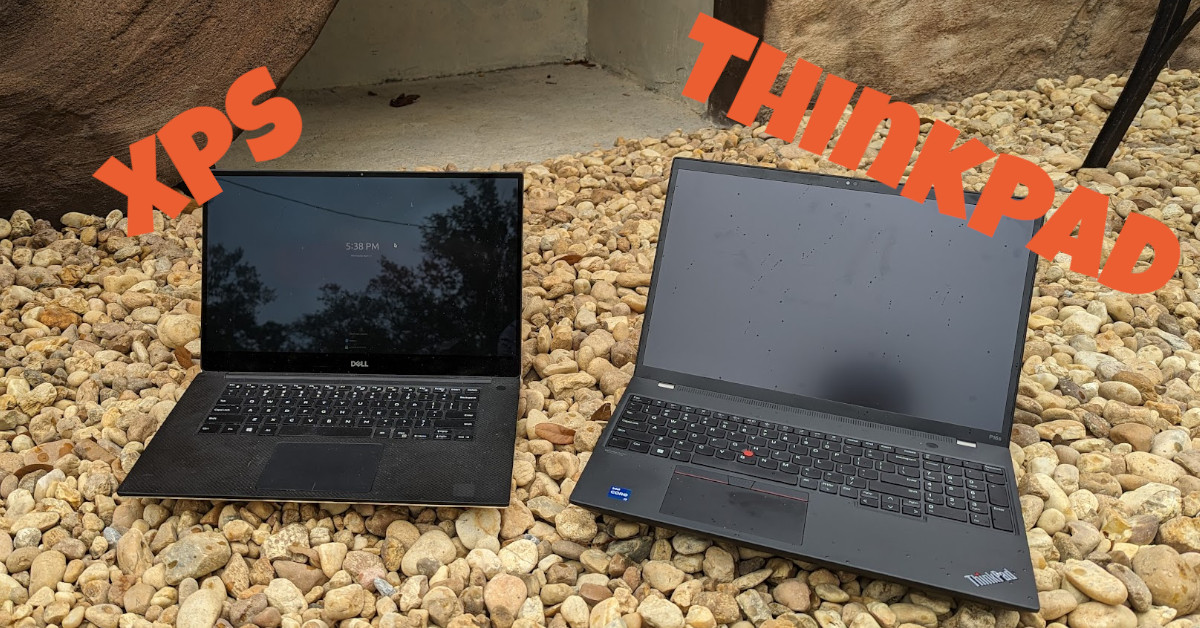
I got a new computer! I’ve finally left the Dell XPS line! This is my first time getting a laptop that already has Linux on it. And, I’m excited to have a little larger screen now. (Actually, I’m a bit slow. I’ve had it almost 7 months now, so I can comment a little better on things I like and don’t like.)